Find your way around Studio
The Studio sidebar, the switch between Personal and squads, the Home dashboard and the Compose list.
Studio. Any plan.
Studio, at studio.breakingthelines.com, is where creators make and publish. Readers use Platform at breakingthelines.com. One account signs in to both.
Open Studio
- On Platform at breakingthelines.com, open the Account menu (your avatar).
- Select Studio. Studio opens in a new tab.
Opening studio.breakingthelines.com while signed out goes to Sign in first.
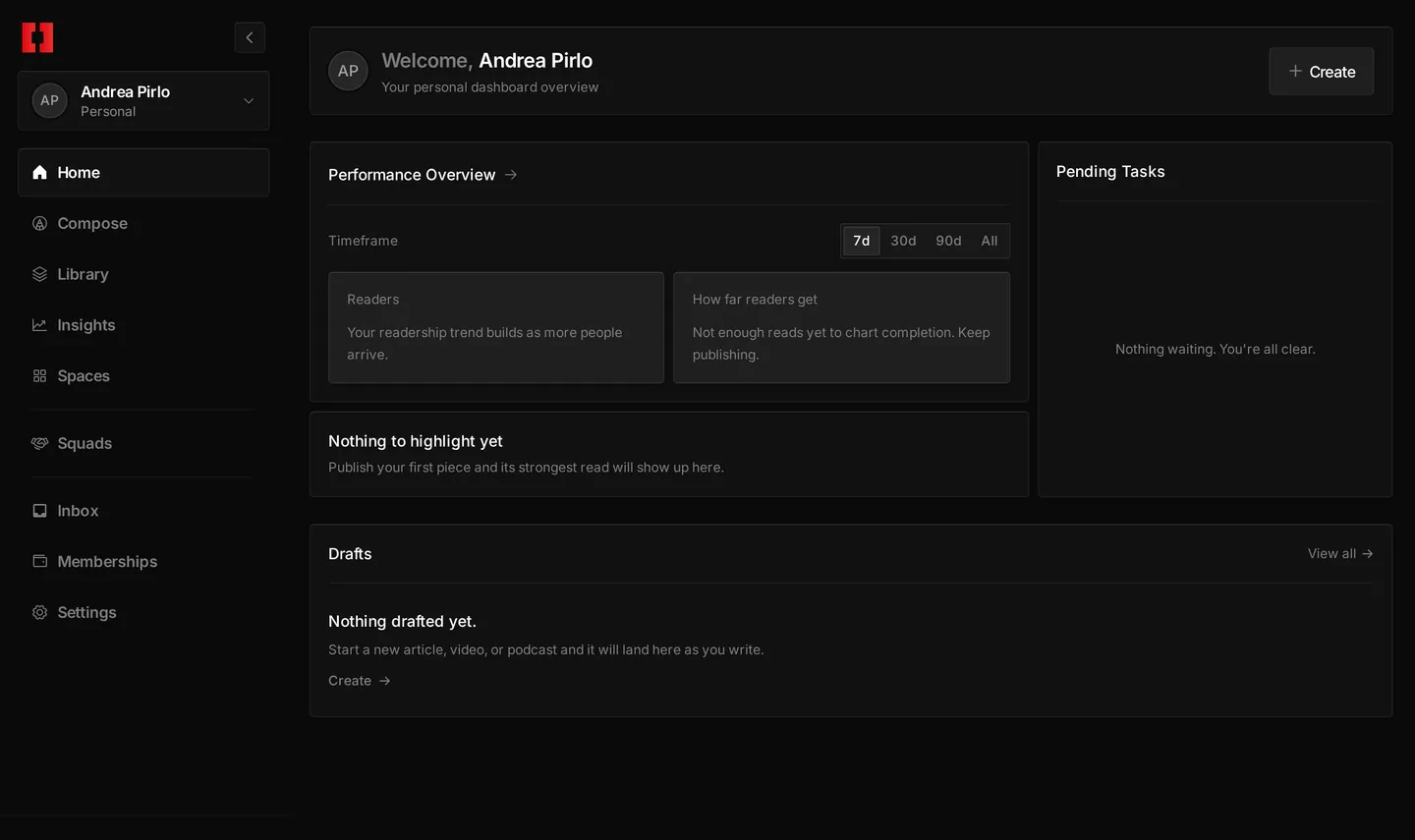
Sidebar
- Home: your dashboard.
- Compose: your pieces, with Content, Collections and New underneath.
- Library: pieces you saved, liked or are reading. Personal scope only.
- Regista: the Regista page, with Clipboard, your chats. See use Regista in Studio.
- Insights: how your pieces are read. See Insights.
- Squads: the squads you belong to, and squad invites waiting for you.
- Inbox: notifications and tasks.
- Memberships: what you subscribe to, the tiers you sell, and payouts.
- Settings: profile, billing, imports and connected accounts.
- Open Profile: your public profile on Platform.
- Logout.
Regista also sits in the corner of every Studio page. See use Regista in Studio.
Switch between Personal and a squad
The name at the top of the sidebar shows where you are working: Personal, or a squad.
- Select the name at the top of the sidebar.
- Choose Personal, one of your squads, or Create a squad.
In a squad, the sidebar adds Board, Gameday and Members, plus Submissions while contributor pieces wait for review. Members opens for squad owners and captains. Switching keeps you on the same page when that page exists in both places. See create a squad and the Board.
Home
Home opens with Welcome and your name, and a Create button that starts a new piece. Below it:
- Performance Overview: readers and how far they get, over 7d, 30d, 90d or All.
- Strongest piece: your best-performing piece in that range.
- Pending Tasks: tasks assigned to you, across your squads.
- Drafts: your latest drafts.
Compose
Compose, then Content, lists your pieces in tabs:
- Drafts, Published and Archived.
- Collaborations: pieces other Line Breakers invited you to edit. Personal scope only.
- For squads: pieces and commissions for squads you contribute to.
- Submissions: in a squad, contributor pieces waiting for a publisher.
Format filters, Search, List view and Grid view sit above the list. Each row has icons to view stats, edit, and archive the piece.
Was this page helpful?